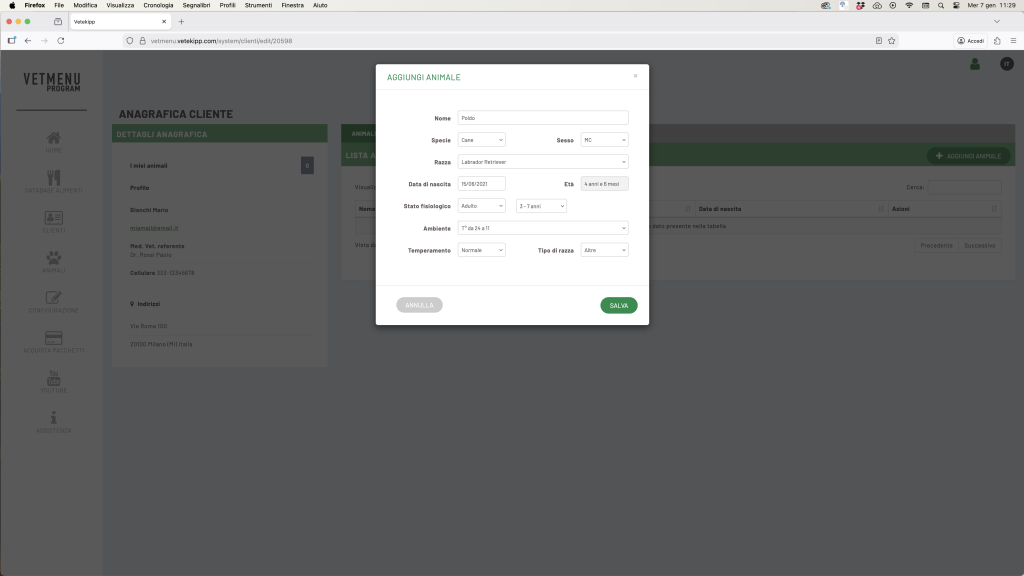


From the customer file, click on “View” to access the master data, then click on “Add animal”.

4.1 Entering personal details
A window will open containing the fields for the animal.
Please fill in:
- First name (e.g. Poldo)
- Species (Dog or Cat)
- Gender:
- Male
- Castrated male
- Female
- Spayed female
💡 Castration automatically reduces energy requirements by 20%.
📘 Example: in this case, Poldo is a neutered male.
4.2 Breed and date of birth
In the Breed field, you can select from the drop-down menu or type in a search term.
Breeds that are not compatible with the selected species will be disabled (shown in grey).
Enter the date of birth: the programme will automatically calculate the age.
📘 Example: 15 June 2021 → 4 years and 6 months. (date referring to the day this tutorial was created)
4.3 Physiological state and age group
You can choose from:
- Growth
- Adult
- Pregnancy
- Lactation
💡 This choice affects the calculation of energy requirements.
If you select “adult”, a further menu will open for you to specify the age group:
- 1–2 years → the programme will use a formula starting at 130 kcal/kg⁰·⁷⁵
- 3–7 years → the programme will use a formula starting at 110 kcal/kg⁰·⁷⁵
- >7 years → the programme will use a formula starting from 95 kcal/kg⁰·⁷⁵
📘 In our example, Poldo is an adult dog aged between 3 and 7 years.
4.4 Environment, temperament and breed
Ambient temperature affects energy requirements:
- from 24°C to 11°C → no correction (factor 1.0)
- more extreme temperatures → variable correction factors
Temperament also plays a part:
- Lethargic → 0.7
- Sedentary → 0.8
- Calm → 0.9
- Normal → 1.0
- Assets → 1.1
Finally, breed can also influence an increase or decrease in energy requirements (e.g. Great Danes have higher requirements, whilst Nordic breeds have lower ones).
📘 For Poldo, select ‘Normal’ under Temperament and ‘Other breeds’ under Breed.
💾 Save
Click Save to save the data.
The animal will now appear in the list of animals associated with the customer.
✅ Hai inserito con successo il primo animale!