

From the nutrient requirements calculation window, click on ‘Diet Formula’ to proceed with formulating the diet

You can now create a complete and balanced diet for your pet.
For each ingredient, you will need to select:
1. The food category;
2. Food;
3. The amount of food.
7.1 Food selection
To select the first ingredient, choose a category from the drop-down menu:
- Herbs and spices
- Meat and offal
- Cereals and starchy foods
- Fruit
- Supplements
- Dairy products and eggs
- Oils and fats
- Fish
- Pet food
- Vegetables and pulses
Once you have selected the category, click in the cell to the right and select the ingredient from the drop-down menu.
💡The VetMenu Program database contains around 180 ingredients; if you want to add a new one, follow the instructions in the next chapter.
7.2 Quantity and verification
Once you have entered the ingredient, click in the cell to the right and enter the daily amount you intend to give.
In the top right-hand corner, you will see the FEG kcal (i.e. the energy target), the calorie content of the diet (diet kcal) calculated based on the quantities of ingredients entered, and the weight of the diet in grams, with a further breakdown into moisture and dry matter.
In the table below, the main nutrients (protein, fat, carbohydrates, fibre, ash, calcium and phosphorus) are expressed in grams per day; % DM, g/Mcal (where the denominator is the diet’s energy content); finally, only protein, fat and carbohydrates are expressed as % ME (energy distribution of nutrients in the diet).
📘 Example:
Energy and nutritional values of Poldo’s diet following the inclusion of the ingredients and their daily quantities.
| Food | Quantity |
| Chicken breast | 180 g |
| Chicken livers | 15 g |
| Rice | 40 g |
| Sunflower oil | 7 ml |
| Salmon oil | 3 ml |
| Butter | 5 g |
| Carrots | 50 g |
| Courgettes | 40 g |
| Apple with skin | 30 g |
| Supplement | 5 g |

7.3 Nutritional analysis
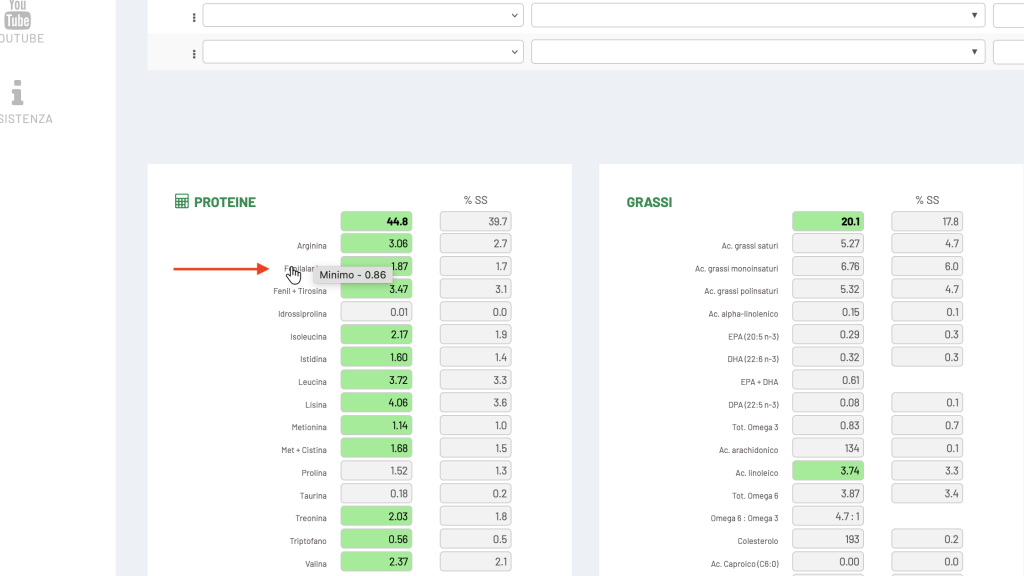
The table shows the total protein and amino acids, total fat and fatty acids, minerals and vitamins in the formulated diet.

If you hover your mouse over each nutrient, the minimum and maximum recommended amounts will be displayed.

COLOUR KEY
🟩 Green = optimal value
🟨 Yellow = value above the maximum
🟥 Red = missing data
⚠️ Chlorine often appears in red as it is not always included in food databases.
7.4 Dietary variations
There are two ways to create a second diet:
- Blank template – a new diet from scratch.
- Duplicate diet – a copy of the previous one.
📘 Example: duplicate Poldo’s diet, replacing chicken with salmon.
The software will automatically update the nutritional information.
7.5 Nutritional analysis by food
By clicking on the icon next to each food item, you can see how it contributes to the various nutrients.
If a value exceeds the maximum (e.g. selenium), the nutritionist can adjust the quantity or substitute the food item.
7.6 Printing meal plans
Once you have saved, click on “Print diet”.
Select one or more diets and generate the PDF.
The PDF file will be saved in the download folder specified in your browser.
The document will include:
- details of the owner and the animal;
- medical history and physical examination;
- weights, BCS, MCS;
- List of foods with quantities and nutritional values.
✅ Report pronto per la consegna.