


From the main menu, go to Food Database → Add Food.

A window will open to create a new ingredient.
- Enter your name and press TAB to confirm.
- The programme will ask you to confirm your entry.
- Select a category (meat, fruit, supplements, etc.).
- If it is a supplement, please specify the form (tablet or capsule).
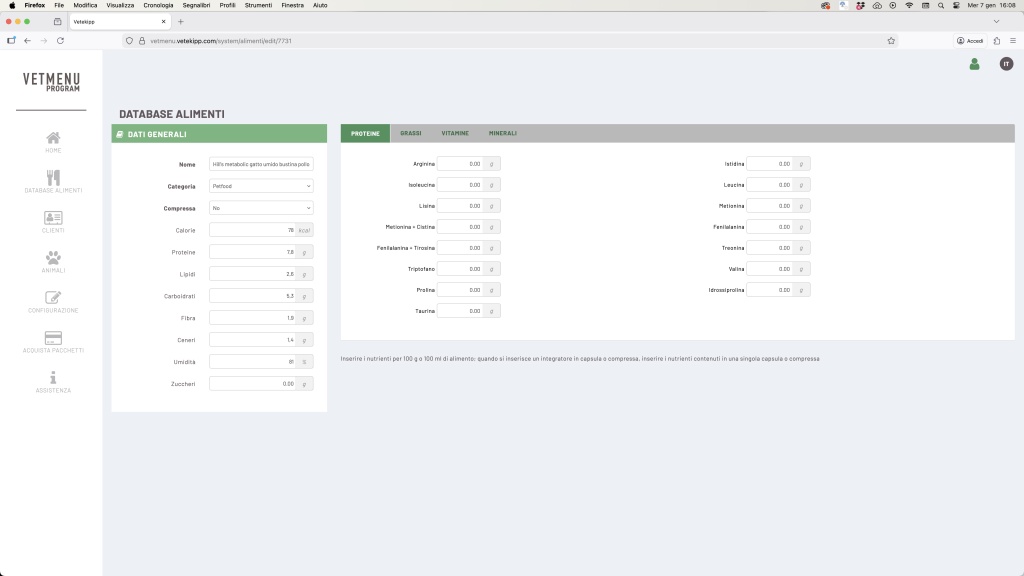
Enter the available nutritional values: calories, protein, fat, carbohydrates, fibre, minerals, vitamins, etc. (Enter the nutrient values per 100 g or 100 ml of food)
📘 Every time you move to a new field, the programme automatically saves the data.
💡 The new ingredients will only be visible in your personal database and will appear on the last few pages, after the ingredients already in the database.
⚠️ Remember to always check the units of measurement for nutrients (e.g. g vs mg) when importing data from external sources.