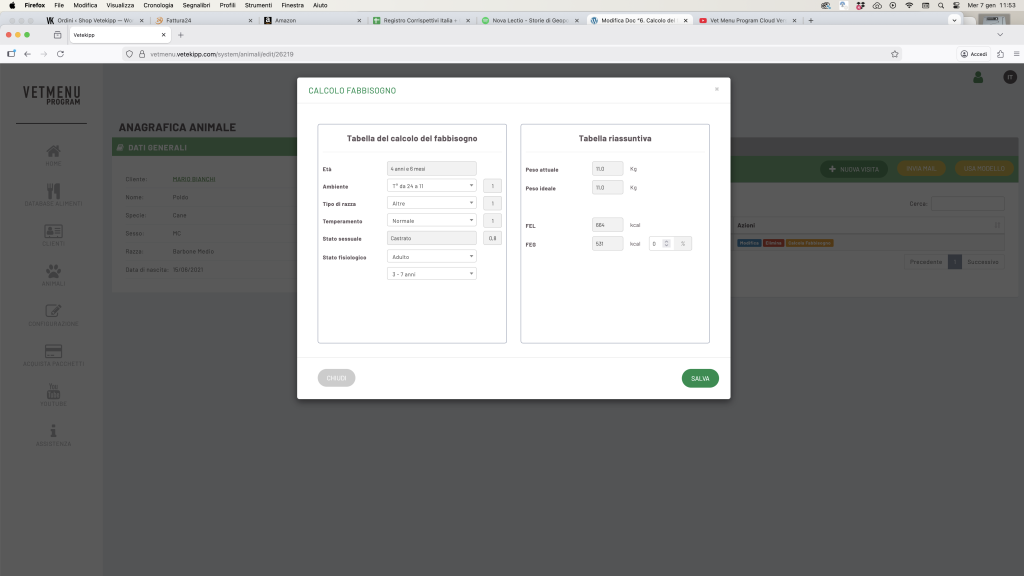


Click on “Calculate requirements” to open the summary window.

You will find two tables:
On the left, the ‘Requirement Calculation Table’ summarises the animal’s details (age, environment, breed, temperament, sexual and physiological status) and the relevant coefficients applied.
📘 Example:
The “Requirements Calculation Table” shows that
Poldo, aged “4 years and 6 months”;
Environment: “Temperature from 24°C to 11°C” (correction factor: x1.0) → no reduction in demand;
Breed type: “Other” (correction factor: x1.0) → no reduction in requirements;
Temperament: “Normal” (correction factor: x1.0) → no reduction in requirements;
Sexual status: “Castrated” (correction factor: x0.8) → 20% reduction;
Physiological status: ‘Adult’, with the selected age range ‘3–7 years’.
________________________________________________________________________________
On the right, the ‘Summary Table’ summarises the animal’s current and ideal weight, the Gross Energy Requirement (GER) and the Daily Energy Requirement (DER), where:
FEL = Ideal weight⁰·⁷⁵ × 130 / 110 / 95 kcal EM (depending on the age group selected in section 4.3);
FEG = FEL × correction factors
📘 Example:
The “Summary Table” shows that Poldo currently weighs 11 kg and has an ideal weight of 11 kg;
Poldo’s Gross Energy Requirement (GER) is calculated as follows:
11⁰·⁷⁵ × 110 = 664 kcal EM
Poldo’s Daily Energy Requirement (DER) is calculated as follows:
664 × × 0.8 = 531 kcal EM/day
________________________________________________________________________________
You can manually adjust the FEG by increasing or decreasing it using the arrows next to the FEG cell (each click increases or decreases the FEG by 5%).
💾 Click Save to confirm the FEG you have just generated (and any changes you have made), then click Diet Formula to proceed with formulating the diet.